 ApkRunner
The extension is for Chrome on a computerOn this phone you can run the APK right here, in the browser: the same cloud Android device, free minutes, nothing to install.
Run an APK in the browserAndroid emulator for Chrome
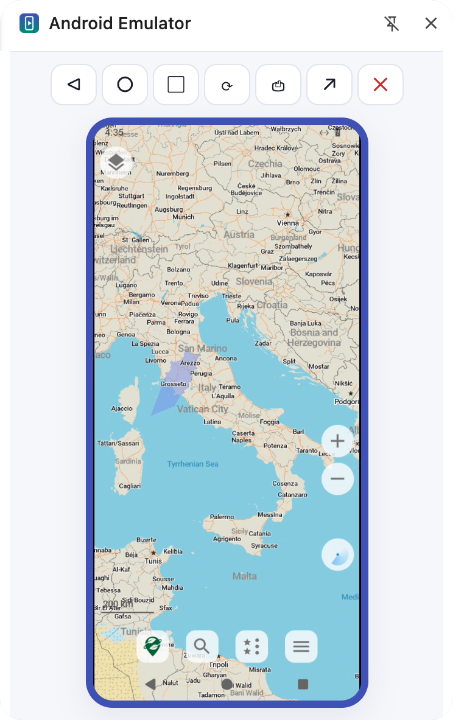
Run APK files on a real Android™ device in the cloud, right in Chrome's side panel. Upload an APK, pick the Android version and screen size, and use it — no Android Studio, no virtual machine, nothing heavy on your computer.
Built for testers and developers
Check a build on the Android version and screen you need in seconds, without an emulator eating your laptop's memory.
Upload any APK
Drop an .apk, .xapk, .apks or .apkm up to 200 MB. It is checked first: package, version, minimum Android version and ARM support.
Android 12–15, many screens
Compact, standard and large phones, foldables and tablets — by size in dp, the way apps lay out. Sharp 2× rendering on paid plans.
Open the page you are on
See your site on a real Android browser: from the side panel or the right-click menu.
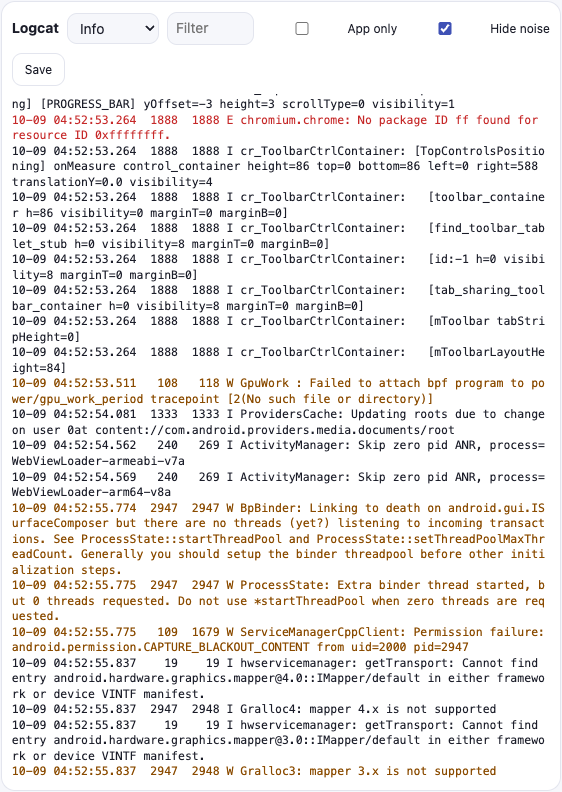
Logcat, live
Stream device logs with level and text filters, show only your app's lines, hide graphics-driver noise, save to a file.
Screenshots and recordings
Capture the screen in one click or record a video of a bug to attach to your ticket.
A fresh device every time
Each session runs on its own cloud device that is thrown away when it ends. Uploaded APKs are deleted after an hour.
Debug without the setup
Back, Home, Recents and rotation; type with your keyboard, scroll with your mouse. Move the session from the side panel to a full tab for a bigger screen, logcat and recording.
- Install more APKs into a running device
- Logs filtered to your app with one tick
- Warnings when an app needs Google Play services
- Works on any computer with Chrome
On a Chromebook too
Installing an APK on a Chromebook usually means developer mode or ADB from the Linux environment, and school and work Chromebooks often block both. The extension runs the APK on a cloud device instead, so there is nothing to switch on and nothing to wipe.
- Any APK, not only apps from Google Play
- Your Chromebook's own Android apps and files stay untouched
- Fine on low-memory Chromebooks: the device runs in the cloud
- On a managed Chromebook, your admin has to allow Chrome Web Store extensions
Can't add extensions? Run the APK in a tab instead, no extension needed.
Not a developer? Look inside any APK
Got an APK from a website or a friend? Open it on a throwaway cloud device first and see what it does — your own phone stays untouched.
Add the extension
Install it from the Chrome Web Store and sign in with Google.
Drop an APK or a link
Choose a file, or open a web page instead. Pick the Android version and the screen.
Use it
The device starts in the side panel, usually in a minute or two. End the session and it is gone.
Simple pricing
Start with free minutes, no card. Paid plans differ only in how long they last. One account for the extension and apkrunner.com.
Free
Free minutes to try it
Add to Chrome- One session or several
- Android 12–15
- Phone screens at 20 fps
- Logcat and screenshots
Weekly
Cancel anytime
Choose Weekly- Everything in Free, plus
- A week of access
- Sharp 2× video at 30 fps
- Foldables and tablets
- Priority in the queue
- Your phone kept for next time
Monthly
Most popularCancel anytime
Choose Monthly- Everything in Free, plus
- A month of access
- Sharp 2× video at 30 fps
- Foldables and tablets
- Priority in the queue
- Your phone kept for next time
Yearly
Save 40%$71.90 billed yearly
Choose Yearly- Everything in Monthly, plus
- The lowest price a month
- One payment a year
You choose a paid plan in the extension, after you sign in. Prices in US dollars, taxes included. Fair use on paid plans: past about 30 hours a month, sessions still run, after other paid ones. The cloud device has microG in place of Google Play services.
Questions
Does it have Google Play services?
Not Google's own. In their place the cloud device has microG, their open-source replacement, so most apps that need them run and get push notifications. Google sign-in, purchases through Google Play and Play Integrity checks (banking apps, some games) may not work. ApkRunner tells you when an APK uses them.
Which APKs work?
An .apk, or a bundle of split APKs as .xapk (with its OBB data files), .apks or .apkm (APKMirror), up to 200 MB, with code for ARM devices (or no native code at all). Android App Bundles (.aab) are a developer format and are not supported; x86-only builds will not install. No APK file at hand? Free apps are on APKMirror and open-source ones on F-Droid: download the file in Chrome, then drop it into the extension.
Which browsers and computers does it work on?
Desktop Chrome on Windows, macOS, Linux and ChromeOS, and other browsers that install extensions from the Chrome Web Store, such as Edge and Brave. It does not work on phones or tablets, or in Firefox and Safari.
Is my APK private?
Your upload is only installed on your own session's device and is deleted from our servers after one hour. Each device is discarded when the session ends. See the privacy policy.
How long can a session last?
The free plan gives free minutes in total, and one session can use all of them; paid sessions last up to an hour each. A session ends after 3 minutes without input, so an idle device does not use up your minutes.
Why does the extension ask to read the current tab?
So the side panel can offer to open the page you are on. It reads only the address of the active tab while the panel is open, and sends it nowhere unless you press "Open on Android".
Get ApkRunner
Install "Android Emulator Online" from the Chrome Web Store, click its icon and pick a device. Questions: hello@apkrunner.com
Add to Chrome — it's free